

Controlled AI workflow integration
AI Automation for Business Workflows That Need Control
AI workflow integration for businesses that need measurable automation with explicit data boundaries, human review, permissions, and recovery paths.
This page is for operators, founders, and department leaders who want AI automation attached to a controlled workflow instead of a fragile demo.
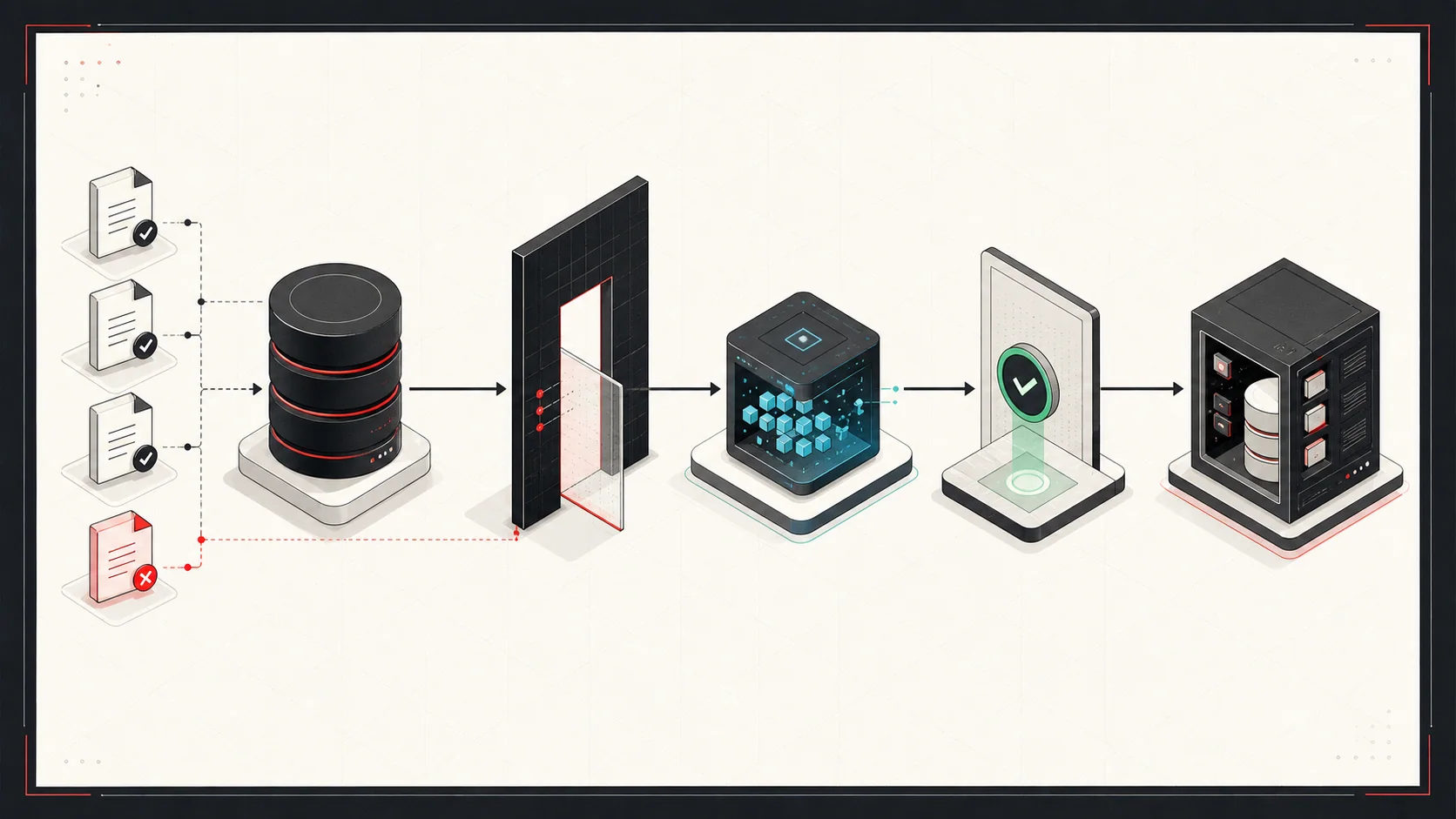
Best first use case
A narrow repeated workflow with clear inputs and review.
Typical first outcome
A pilot that drafts, extracts, routes, or recommends.
Safety principle
Human approval before automated writes to business systems.
When AI Automation Is a Good Fit
AI automation works best when it is attached to a real operating constraint. It should remove repeated judgment-light work, surface evidence faster, or prepare cleaner drafts for human review.
- A team repeats the same review, routing, or data-entry task every week.
- The workflow has clear source material and a person who can judge whether the output is right.
- The automation can start with a review step before it is trusted to write back into business systems.
- The business value is measurable through time saved, faster response, fewer errors, or better throughput.
When This Is Not the Right Fit
A clear boundary protects both sides from starting work that does not need this kind of architecture involvement.
- There is no repeated workflow, baseline, or operating constraint to improve.
- Nobody owns the source material or can review whether the output is correct.
- The first requirement is autonomous access to write into business systems without approval or rollback controls.
- A standard feature in an existing product already handles the workflow safely enough.
Observable Engagement Outcomes
The result should be reviewable in the system, operating workflow, or written decision—not a projected benefit without a baseline.
Mapped workflow and evaluation set
Documented inputs, decisions, review points, failure cases, and representative examples for judging output quality.
Validated controlled pilot
A bounded workflow tested against agreed examples, with accepted outputs, exceptions, and escalation behavior visible.
Operational control evidence
Verified permissions, audit records, approval paths, and rollback behavior before broader system access is considered.
Problems This Solves
- Teams manually reading, classifying, summarizing, or routing the same documents and emails.
- Order, intake, support, or review workflows that need AI help but still require human approval.
- Messy handoffs between inboxes, spreadsheets, CRMs, ERPs, and e-commerce platforms.
- AI experiments that need permissions, auditability, and production guardrails.
What You Get
Workflow assessment
A clear map of inputs, outputs, review points, business rules, and systems the automation must respect.
Controlled AI pilot
A narrow automation that extracts, drafts, classifies, routes, or recommends with human review built in.
Integration and safety controls
Validation, logging, permissions, approval queues, and rollback paths before automated writes are allowed.
A Practical Pilot Structure
- 1
Map the workflow
Document inputs, decision points, systems touched, failure modes, and the human review step before choosing a model or tool.
- 2
Build a narrow first pass
Start with one bounded workflow such as email intake, document triage, quote preparation, order review, or internal knowledge lookup.
- 3
Add controls before scale
Use permissions, audit logs, confidence thresholds, approval queues, and rollback paths before allowing automated writes.
Relevant Technologies and Platforms
Engagement Options
AI opportunity review
Identify one or two workflows where AI can reduce repeated work without creating operational risk.
Pilot build
Build a focused automation around real examples, validation rules, and a review surface.
Production hardening
Add permissions, monitoring, exception handling, and integration controls for live business use.
Example Use Cases
Email-to-order automation
Parse inbound email, extract order intent, validate fields, and prepare a reviewed order draft.
Document intake
Extract structured data from PDFs, forms, claims, invoices, or service requests for human approval.
Internal knowledge workflows
Help teams search, summarize, and route information without giving the model broad write permissions.
Controls That Matter
The safest AI systems are boring around permissions, evidence, and rollback. That is where most production value comes from.
- Keep the model separate from system permissions.
- Use read-only access until the workflow has proven accuracy.
- Store evidence with each generated recommendation or draft.
- Log failures and ambiguous cases as product feedback, not one-off exceptions.
Related Work and Writing
Inbox2Order Case Study
Email-to-order automation that turns unstructured email inquiries into structured order drafts.
Building Inbox2Order
A project writeup covering parsing, validation, order creation, and automated communication.
Safe AI Agents
A practical architecture for AI agents that read business data while staying inside controlled permission boundaries.
Common AI Automation Questions
What is AI workflow automation?
AI workflow automation uses language models, rules, integrations, and human review to reduce repeated document, email, routing, and data-entry work. The best first projects automate a narrow workflow where a human can quickly verify the output.
Where should a business start with AI automation?
Start with a workflow that is repeated often, has clear inputs, and does not require the AI system to make irreversible decisions. Good first candidates include inbox triage, document extraction, draft responses, order intake, and internal lookup tools.
How do you make AI automation safer?
Separate model reasoning from system permissions, keep early pilots read-only, require approval for writes, store evidence with each output, and monitor ambiguous cases. The system should make review easier before it is allowed to act directly.
How long does an AI automation pilot take?
A focused pilot can often be scoped around a few weeks of work after the workflow is understood. More complex automations that touch ERPs, CRMs, payment systems, or customer-facing actions need more discovery and controls.
Start With a Controlled AI Workflow Assessment
Share the repeated task, the source data, the systems involved, and what a correct result looks like. I will help decide whether an AI automation pilot is the right next step.
An evidence-based recommendation to automate, redesign, defer, use an existing product, or run a bounded pilot.
Final scope depends on the workflow, available examples, systems involved, and access requirements.