


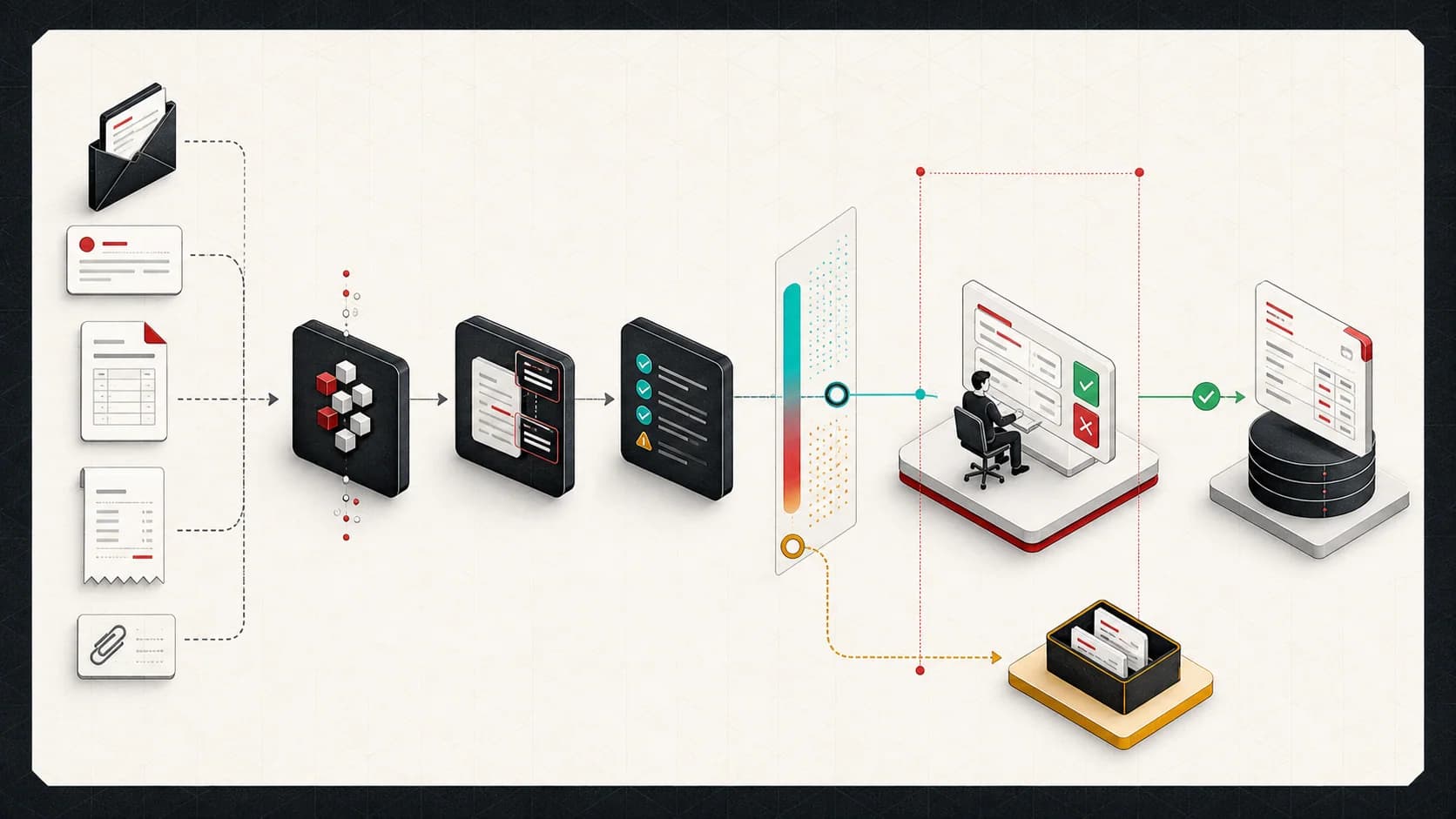
Many businesses still take orders through email. That is not a failure. Email is flexible, familiar, and easy for customers. The problem is what happens after the message arrives.
Someone has to read it, understand the request, identify the customer, find the products, enter quantities, check pricing, ask follow-up questions, and create the order in another system. That work is repetitive, but it is not simple. Customers do not write emails like API payloads.
Email-to-order automation is about turning that unstructured message into a reviewed, validated order draft.
This is one example of the AI workflow automation consulting pattern I use for business processes that need review, validation, and integration controls.
The input is messy by default
Real order emails include:
- Product names instead of SKUs
- Abbreviations
- Old pricing
- Missing shipping details
- Attachments
- Multiple requested delivery dates
- Follow-up replies that change quantities
- Customer signatures and unrelated thread history
The automation has to separate signal from noise before it can create anything useful.
Step 1: capture the full context
The system starts by reading the email thread, not just the newest message. For many business orders, the final request depends on earlier context.
Useful context includes:
- Sender email
- Subject line
- Current message body
- Prior thread messages
- Attachments
- Customer records
- Product catalog
- Historical order patterns
This context helps the system distinguish "same as last time" from a brand-new request.
Step 2: extract structured fields
The AI step should extract a strict schema, not freeform notes.
For example:
interface OrderDraft {
  customerName: string
  companyName?: string
  email: string
  requestedShipDate?: string
  shippingAddress?: string
  items: {
    sku?: string
    productName: string
    quantity: number
    notes?: string
  }[]
  missingInformation: string[]
}
The schema keeps the workflow grounded. The model can be flexible while the application remains strict.
Step 3: validate with normal code
AI should not be responsible for every decision. Once the extraction is complete, normal application logic should validate it.
Validation checks might include:
- Does this customer exist?
- Is the SKU active?
- Is the requested quantity valid?
- Is the address complete?
- Does the order meet a minimum quantity?
- Does the customer require purchase order approval?
- Are any products out of stock?
This is where business rules belong. The model proposes. The system validates.
Step 4: route incomplete orders
Not every email can become an order immediately. That is fine. A useful automation should identify missing information and make the follow-up easier.
Instead of creating a bad order, it can draft a response:
Thanks for the order request. I can prepare this, but I need two details first:

1. The shipping address for this order
2. Whether you want 12-count or 24-count cases for the requested SKU
The human can edit and send the message, or approve an automated follow-up once the workflow is trusted.
Step 5: create a reviewed order
The safest first version should create an order draft or staging record, not immediately commit to every downstream system.
A reviewer should see:
- Original email
- Extracted order fields
- Product matches
- Validation warnings
- Missing information
- Proposed order total
- Destination system payload
Only after approval should the system create the Shopify, NetSuite, WooCommerce, or custom platform order.
What makes this valuable
Email-to-order automation saves time, but the bigger value is consistency. The system can apply the same validation rules every time. It can log missing information. It can show why an order was blocked. It can reduce the silent errors that happen when people are moving quickly.
The best version does not replace the human relationship with the customer. It removes the repetitive translation work between the inbox and the order system.