


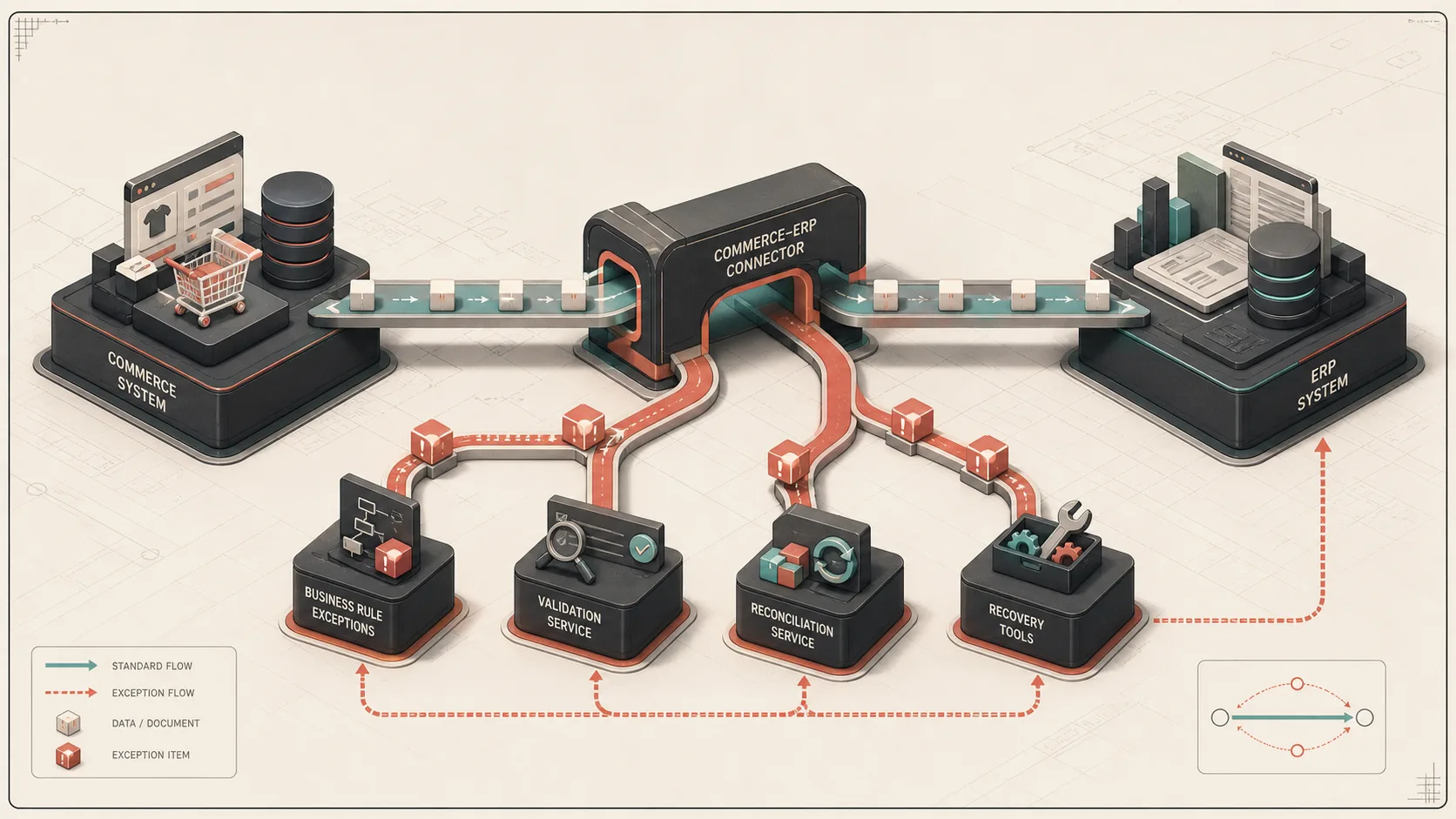
Shopify-NetSuite connectors are valuable. They solve a real problem, especially when a business needs orders, customers, items, inventory, and fulfillment data flowing without building everything from scratch.
But connectors are not the same thing as an integration strategy. A connector gives you a set of configurable flows. Your business still has its own rules about fulfillment, billing, inventory, customer segments, reporting, and exception handling. When those rules become specific enough, the connector alone stops being enough.
For the service page behind this work, see Shopify-NetSuite integration consulting.
The sign is not failure. It is friction.
You do not need to wait for the connector to fail completely before adding custom integration work. The signal is recurring operational friction.
Look for patterns like:
- Staff manually editing orders after sync
- Warehouse teams asking which NetSuite lines are safe to fulfill
- Finance exporting spreadsheets to reconcile Shopify payouts
- Customer support checking multiple systems for tracking history
- Engineers rerunning failed flows without knowing whether the retry is safe
- Teams using tags, memos, or spreadsheets as unofficial control systems
Those are signs that the connector is moving data, but not fully modeling the workflow.
Connectors are weakest around business-specific logic
Connectors are built for common paths. Your business rules live in the uncommon paths.
Examples include:
- Bundles that need to explode into NetSuite components
- Discounts that need to post to specific accounting items
- Warehouse routing by postal code, customer type, or inventory availability
- Partial fulfillments from multiple locations
- Lot-managed items that need bin and inventory detail
- B2B orders that become invoices instead of cash sales
- Marketplace orders with payout-specific reconciliation needs
When the integration rule starts with "except when," you are probably outside standard connector territory.
Custom middleware can be small
Custom middleware does not need to replace the connector. In many cases, the best architecture is connector plus focused custom services.
The connector can keep handling ordinary synchronization while custom code handles:
- Pre-sync order normalization
- Post-sync validation
- Exception reporting
- SuiteQL dashboards
- Retry tools
- Fulfillment reconciliation
- Billing automation
That keeps the connector useful while avoiding fragile workarounds.
For order creation specifically, the Shopify-to-NetSuite order sync architecture shows how durable ingestion, business idempotency, failure classification, and reconciliation fit around either a connector or custom adapter.
SuiteQL fills the visibility gap
One of the most useful additions around NetSuite connectors is SuiteQL reporting. Connectors are usually event-driven: an order changed, a fulfillment changed, an item changed. Operations teams often need question-driven views instead.
They ask:
- Which sales orders are pending fulfillment by location?
- Which orders are partially fulfilled?
- Which item fulfillments have tracking numbers?
- Which orders failed billing?
- Which SKUs are missing lot inventory?
SuiteQL is a strong fit for those questions because it can join NetSuite transaction, line, item, package, and inventory tables directly.
Recovery tooling matters more than dashboards
Dashboards show problems. Recovery tools close the loop.
A mature integration usually needs small internal actions like:
- Retry this order sync
- Rebuild this fulfillment payload
- Close remaining order lines
- Re-read tracking from the warehouse system
- Reconcile this cash sale or invoice
- Export pending exceptions to CSV
These tools do not need a large application. A small admin surface or script library can save hours when it is designed around the actual support workflow.
When to keep the connector
Keep the connector when:
- It reliably handles the core happy path
- Business users can configure simple field mappings
- The vendor supports your common objects
- The connector has useful monitoring and retry behavior
- You only need custom logic for edge cases
Replacing a connector is expensive. Extending it is often the better engineering choice.
When to build custom
Build custom integration code when:
- Data transformations are too specific for field mapping
- Failed syncs require business-aware retries
- NetSuite state needs SuiteQL joins before action
- You need deterministic behavior for finance or fulfillment
- You cannot explain what the connector will do in a given edge case
The deciding factor is control. If the workflow affects revenue, inventory, or customer experience, you need enough control to reason about it.
The broader Shopify ERP integration architecture applies the same ownership and recovery decisions beyond NetSuite.
A connector is a component, not the architecture
The best Shopify-NetSuite setups treat the connector as one component in a larger integration system. Around it, they add validation, reporting, exception handling, and custom business logic where needed.
That balance keeps the system pragmatic. You avoid rebuilding what already works, and you invest custom engineering where it protects operations.