

Shopify + NetSuite integration architecture
Make Shopify and NetSuite Work Like One Reliable Commerce Platform
Shopify and NetSuite integration consulting to keep orders, payments, inventory, and refunds consistent, with clear recovery steps when updates fail.
Your team should not have to chase missing orders or explain why two systems show different stock. I help define which system owns each fact, how updates move, and how staff resolve failures. Start by reviewing the flows that cause the most manual repair.
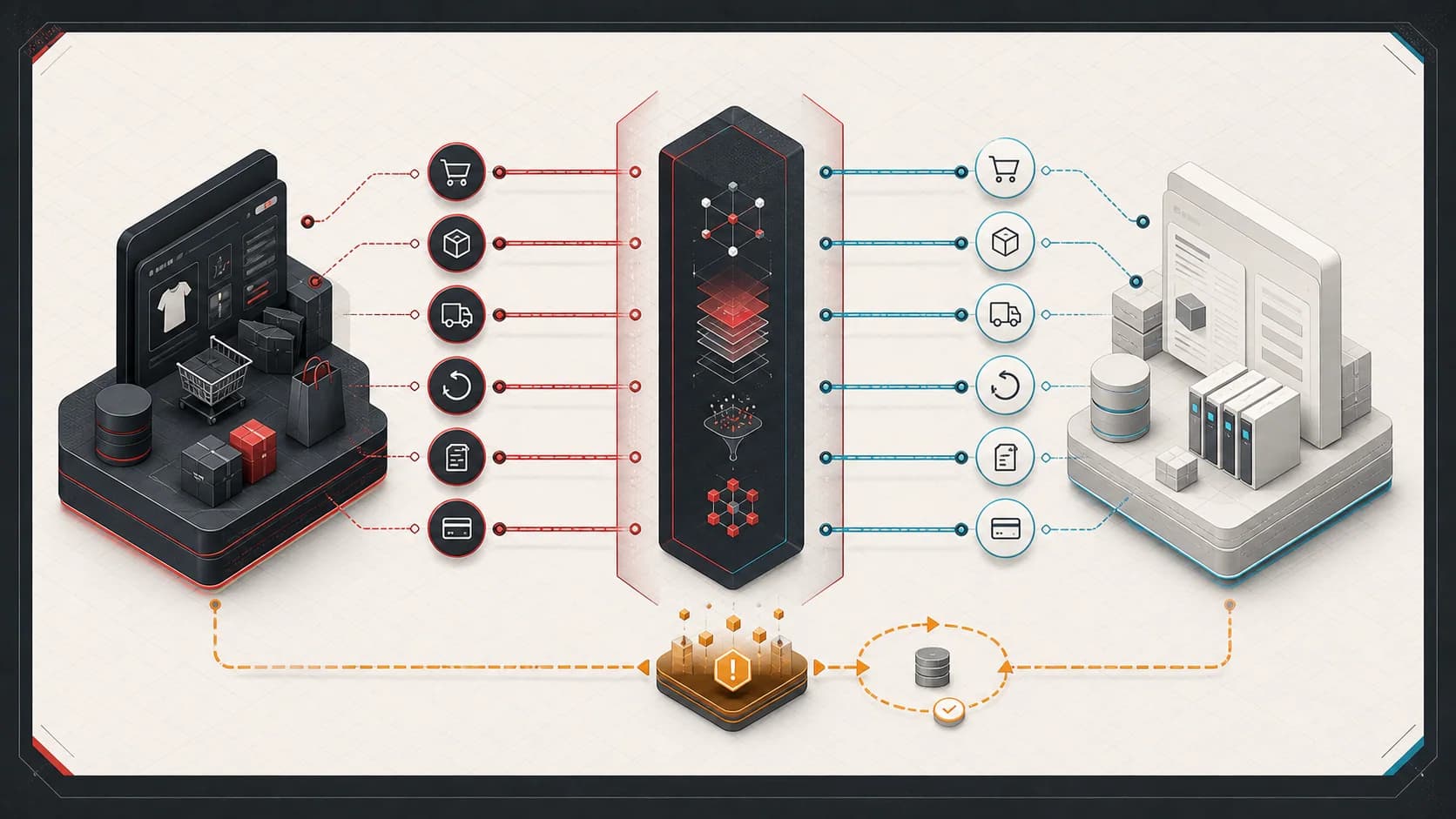
Reliable
Failures are classified, retried safely, and prevented from duplicating business records.
Observable
Orders and financial events can be traced across systems with shared identifiers.
Recoverable
Operators have explicit exception, replay, reconciliation, and manual recovery paths.
Where Shopify + NetSuite Integrations Fail
These are not inevitable problems, and a standard connector can be the right answer for standard flows. Risk appears when business-specific rules, timing, or failure behavior are left implicit.
- Duplicate orders appear after webhook redelivery, application retry, operator replay, or an ambiguous timeout.
- An order is created only partially because customer, item, discount, tax, bundle, or location mapping fails mid-workflow.
- Payments, refunds, shipping charges, discounts, gift cards, or taxes disagree between commerce and financial records.
- Available inventory drifts because locations, reservations, fulfillment timing, returns, and adjustments have unclear ownership.
- Shopify, NetSuite, a warehouse, and a carrier each report a different fulfillment state or identifier.
- Retry storms, rate limits, duplicate webhooks, and out-of-order events create concurrency that the happy path never modeled.
- SKU, variant, bundle, component, and external-record identifiers are mutable, missing, or interpreted differently.
- Finance and operations reconcile with spreadsheets because logs show API activity but not the business outcome.
When This Is Not the Right Fit
- The standard connector supports the flow and the issue can be resolved through documented configuration.
- The need is a one-time data cleanup rather than a recurring integration or recovery problem.
- There are no representative failures, record examples, or system owners available for diagnosis.
- The requested solution assumes every working integration must be replaced before the exception path is understood.
Observable Engagement Outcomes
Explicit ownership
A written map of which system owns each record, how records match across systems, and who decides what to do when they disagree.
Traceable operations
Examples that show where an order or related update went, which systems accepted it, and where evidence is missing.
Safe recovery
A recovery plan that distinguishes rejected work from an unknown result. Operators can check for an existing record before retrying, then confirm the intended outcome.
Problems This Solves
- Repeated manual repair of orders, payments, refunds, fulfillments, or inventory states.
- Blind retries where the team cannot tell whether NetSuite accepted the first request.
- Connector dashboards that show technical failure without enough evidence to restore the business workflow.
- Finance, operations, and support teams maintaining separate spreadsheets to reconstruct what happened.
What You Get
Boundary and ownership map
A shared view of sources of truth, identifiers, lifecycle transitions, mappings, and responsible systems.
Failure and recovery model
A classification of transient, permanent, ambiguous, replayable, and operator-correctable failures.
Prioritized remediation plan
Sequenced fixes for reliability, reconciliation, observability, and human recovery without assuming a rewrite.
Architecture Principles That Survive Production
The exact platforms and deployment shape vary. These contracts are what keep a commerce integration understandable when volume, vendors, and operating rules change.
- Explicit system ownership
- Define which system owns each business fact and which systems hold projections. Bidirectional synchronization is not an ownership model.
- Stable identifiers
- Keep immutable business and operation identifiers separate from display names, mutable SKUs, and vendor-generated internal IDs.
- Idempotent consumers
- Assume events and commands can arrive more than once. A repeated operation must converge on the same business outcome.
- Durable processing
- Acknowledge inbound events after durable acceptance, then perform slow vendor work outside the request lifecycle.
- Retry classification
- Retry rate limits and transient dependency failures differently from invalid mappings, missing records, or rejected business rules.
- Exception workflows
- Move exhausted or non-retryable work into an owned queue with evidence, status, and a clear next action.
- Replayability
- Persist enough immutable input and mapping context to replay safely after code, data, or configuration is corrected.
- Reconciliation
- Compare expected and actual cross-system state on a schedule. Event delivery alone cannot prove the systems agree.
- Observability and audit trails
- Correlate technical activity with orders, payments, refunds, fulfillments, and operator actions across every boundary.
- Human recovery paths
- Give operations a bounded way to inspect, correct, retry, suppress, or escalate an exception without editing production data ad hoc.
A Recoverable Integration Lifecycle
Consider an illustrative order that appears in Shopify but cannot be found in NetSuite. A timeout does not prove that creation failed. This lifecycle shows what evidence to keep, when to check the receiving system, and when a person must review the result.
1
Shopify
Verify the source of an order event and record its delivery identifier. Keep the order reference too; several deliveries can describe the same order.
2
Ingestion
Save the received event and its identifiers before starting slow work. Keep the original input so an operator can trace what was requested.
3
Validation
Check the customer, items, amounts, and required mappings. Send invalid records for correction rather than repeatedly attempting the same failed request.
4
Durable processing
Track one business operation across repeated attempts. Use idempotency controls so retries cannot create a second order, and limit which failures can retry automatically.
5
NetSuite
Create or update the intended NetSuite record through the integration. Record the response and record identifier; if the request times out, mark the outcome as unknown.
6
Reconciliation
Compare the expected order with NetSuite records. This check is reconciliation. Confirm what exists before another creation attempt; if the evidence is inconclusive, ask for review.
7
Operational visibility
Show the operator the order, evidence, current status, and permitted next action. Record the resolution so the next person does not repeat the investigation.
From Diagnosis to Recoverable Operations
- 1
Trace representative failures
Follow real orders and related records across Shopify, middleware, NetSuite, fulfillment, payment, and reporting boundaries.
- 2
Define the smallest responsible change
Separate configuration, data quality, connector limitations, reporting gaps, and custom architecture work before choosing a fix.
- 3
Prove recovery behavior
Test duplicate events, failed requests, and timeouts with unknown results. Confirm that operators can investigate and recover safely, including during a release or rollback.
Commerce Integration Audit
The audit follows representative orders and related records to find where systems disagree or recovery becomes unsafe. You receive written findings with evidence, business impact, recommended next actions, and ownership decisions. Fixes may involve configuration, data quality, or custom work; replacing a working connector must earn its cost.
The audit reviews
- A map of the workflow, systems, and responsibilities at each handoff
- A check of which system owns each record and how records match across systems
- A review of missing and duplicate records, data checks, and safe ways to retry failed work
- A written plan showing which problems to fix first and how operators will detect failures
Relevant Technologies and Platforms
Engagement Options
Commerce Integration Audit
Review boundaries, ownership, identifiers, mappings, failure modes, retry safety, reconciliation, and operational visibility.
Targeted remediation
Implement the smallest justified connector configuration, middleware, report, exception workflow, or recovery tool.
Integration modernization
Sequence a larger boundary, connector, or workflow change with migration, parallel operation, reconciliation, and rollback controls.
Example Use Cases
Stabilize a live connector
Keep standard flows where they work and add the smallest missing validation, reporting, exception, or recovery layer.
Modernize custom middleware
Replace direct webhook-to-ERP calls and implicit retry behavior with durable, idempotent, observable processing.
Prepare for a platform change
Define stable contracts, migration checkpoints, parallel-run evidence, and rollback before changing a connector or ERP boundary.
Operational Controls That Matter
The implementation can be a connector, focused middleware, scheduled jobs, or a larger platform. It still needs a coherent operating model.
- Bounded concurrency and rate-limit-aware backoff at each vendor boundary.
- Persisted operation state with uniqueness constraints around business idempotency keys.
- Retry policies separated by transient, permanent, ambiguous, and operator-correctable failures.
- Correlation across Shopify IDs, NetSuite internal or external IDs, and internal operation IDs.
- Reconciliation reports for orders, payments, refunds, fulfillments, and inventory projections.
- Exception queues with ownership, age, evidence, resolution notes, and replay history.
- Deployment and migration plans that preserve in-flight work and prevent double-processing.
Shopify + NetSuite Architecture Guides
What an Integration Audit Finding Looks Like
An illustrative finding showing evidence, business risk, a recommended next action, and ownership.
Shopify to NetSuite Order Sync Architecture
A durable order pipeline from webhook ingestion through NetSuite reconciliation and manual recovery.
Preventing Duplicate NetSuite Orders
How to handle duplicate delivery, ambiguous timeouts, stable keys, uniqueness, and lookup-before-create recovery.
Choosing the Inventory Source of Truth
Ownership decisions for locations, availability, reservations, returns, adjustments, drift, and reconciliation.
Reliable Shopify to NetSuite Refunds
Refund classification, identifiers, financial reconciliation, idempotency, and implementation-dependent accounting outcomes.
Idempotency in NetSuite Integrations
A production-oriented pattern for persistence, state transitions, ambiguous failures, safe replay, and reconciliation.
Shopify ERP Integration Architecture
How ownership, queues, retries, reconciliation, observability, and operational tooling change as commerce becomes critical.
Commerce Platform Capability Architecture Case Study
An anonymized case study with verified operating scale, explicit vendor boundaries, and recoverable integrations.
Relevant Commerce Platform Experience
The public evidence is broader than one Shopify-NetSuite flow. It reflects principal-level architecture and implementation leadership across commerce, APIs, integrations, data, fulfillment, payments, finance, and operations.
- 2.19M+
- orders supported since September 2020
- $158.6M+
- commerce revenue supported across the same public reporting period
- 100+
- retail locations participating in unified commerce operations
These verified public career metrics establish the scale of the broader commerce work. They are not revenue attributed to this consulting service or to one subsystem.
Common Shopify-NetSuite Questions
Can Shopify integrate directly with NetSuite?
Yes. Direct integration can be appropriate for a narrow flow with clear ownership, modest transformation, and manageable recovery requirements. The risk is putting long-running NetSuite work, retry behavior, and business mapping directly inside a Shopify webhook request without durable state or reconciliation.
Do I need middleware between Shopify and NetSuite?
Not always. A supported connector may cover standard flows, and direct integration may be enough for a bounded use case. Middleware earns its cost when the business needs durable processing, custom mapping, cross-system state, idempotency, replay, reconciliation, or operator tooling that neither endpoint owns.
Why do Shopify and NetSuite orders get out of sync?
Common causes include ambiguous ownership, missing or mutable identifiers, partial mapping failures, duplicate or out-of-order events, unsafe retries, manual edits, and different payment or fulfillment state models. The useful diagnosis traces one real order across every boundary instead of treating the latest API error as the whole problem.
How should retries be handled?
Classify failures first. Rate limits, dependency unavailability, and some network failures can be retried with bounded backoff and jitter. Invalid mappings, missing required records, and rejected business rules usually need correction or an exception workflow. Ambiguous writes require lookup or reconciliation before another create attempt.
How do you prevent duplicate NetSuite orders?
Use a deterministic business idempotency key, persist operation state, enforce uniqueness locally, and assign a stable external reference where the chosen NetSuite interface and record type support it. After a timeout, look up or reconcile the intended record before creating again. A delivery ID alone is not enough when different events or operator actions can request the same business operation.
Which system should own inventory?
There is no universal answer. NetSuite often owns accounting and on-hand inventory, while a commerce or availability service may own the sellable projection after reservations, safety stock, locations, and fulfillment constraints. The important decision is to assign one owner for each inventory fact and reconcile projections instead of allowing uncontrolled bidirectional updates.
Can you review an existing integration?
Yes. The Commerce Integration Audit is designed for live connectors and custom integrations. It uses representative failures, records, logs, mappings, retry behavior, operator steps, and reconciliation evidence to produce a prioritized remediation plan.
Do you implement fixes after the audit?
When the findings support it and the scope is a fit, implementation can be a separate engagement. The responsible recommendation may also be connector configuration, a report, a small recovery tool, work by the existing team, or no custom build.
What does a Commerce Integration Audit cost?
Final scope depends on the number of systems, representative failures, access, and operational risk. Engagements are scoped around the decision, systems involved, and delivery responsibility. After an initial fit discussion, I propose the scope, deliverables, and fee before work begins.
Make the Integration Recoverable Before the Next Failure
Bring representative orders, mappings, logs, failure examples, and current recovery steps. The first goal is to determine why the systems disagree and identify the smallest responsible fix.
A practical plan to prevent repeated failures, expose disagreements between systems, and help operators recover safely.
Final scope depends on the number of systems, representative failures, access, and operational risk.